ArchivistaBox 2026/III: The New AI Server Platform
Egg, March 24, 2026: With this new release, ArchivistaBox is offering, for the first time, all of the current leading server technologies in the open-source ecosystem on a single platform. Joining the existing core features are Docker containers, the local AI platform Ollama (local artificial intelligence), and the currently best speech recognition system, Whisper (including Swiss German). This is made possible by the integration of ROCm technology, which enables AMD graphics cards to deliver top performance for all tasks in the field of artificial intelligence.
That’s why ArchivistaBox now offers Docker containers
Modern software packages rely on numerous dependencies. To put it simply, Software Alpha depends on Library Beta, but Beta does not run on Operating System Gamma – only on Delta. The classic approach using server virtualization, which has been available for more than 15 years with ArchivistaVM (VirtBox), does offer the possibility of running Software Alpha with the Beta dependency by setting up the Gamma system as a virtual instance. Alpha can then be installed on top of Beta.
Docker containers offer the possibility of running Alpha on Delta by launching Beta and Gamma in a kind of “closed space” (container). In this sense, Docker containers are “lucrative” for software developers because their own software can include exactly those components without having to install or maintain a complete operating system on all delivered instances. For users, the advantage is less obvious, as without a graphical user interface, they are often “lost” with Docker.
Docker’s business model now consists of providing a graphical user interface. While the service is free for individuals and companies with an annual revenue below a certain threshold, the solution is not open source. What is surprising is that this subtle distinction receives little attention in the open-source community. And so it came to pass…
Of course, this technology has been available on every ArchivistaBox in a virtual instance up until now. However, this approach isn’t exactly straightforward, especially since Docker would only be available via the console. With the 2026/III release, Docker is now available directly on the ArchivistaBox GPLv3. Docker is delivered with the Yacht web application. This makes it much easier for “Docker newbies” in particular to get started than if only the console were available.
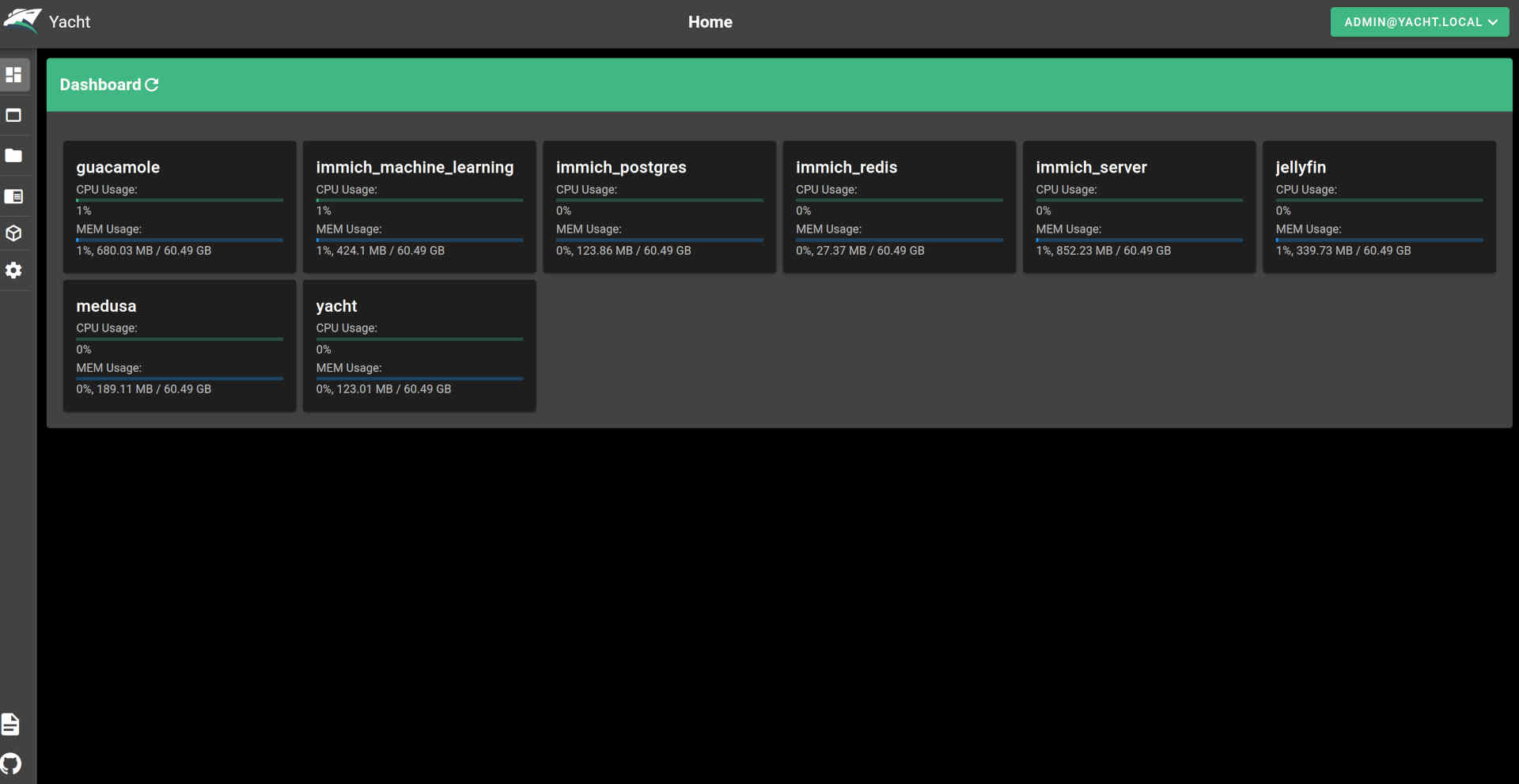
With its Docker integration, ArchivistaBox AGPLv3 is currently the only open-source distribution that offers both web-based management of KVM/Qemu and native Docker support—free of charge and ready to use. This contrasts with solutions like Proxmox, where Docker containers (must) be converted to LXC technology (Linux containers). The latter approach may be an alternative for many scenarios, but ultimately Docker is not available natively. This, in turn, means that not all Docker instances will run.
Native Support for AMD Graphics Cards
As powerful as modern processors are, a graphics card (GPU) is often the better choice for certain applications. Here’s an example: In speech recognition, a dedicated graphics card often completes the task 10 times faster—or even more. In the open-source ecosystem, however, the market leader, NVIDIA, only provides “closed-source” drivers. AMD is the better choice here because its drivers are open-source (firmware excluded). Furthermore, AMD graphics cards offer better value for money. On the other hand, the corresponding software packages (e.g., Blender) often only support NVidia graphics cards.
When our two flagship models, the ArchivistaBox K1 and Everest, were launched in 2021, they came equipped with AMD Radeon RX 580 graphics cards. Although the ROCm drivers were available at the time, software integration often failed in 2021—or at least was frequently unsatisfactory. In 2026, the situation is different: whether it’s AI models, rendering, and/or video processing, driver support is currently available. To be fair, it should be noted that seamless integration can still pose challenges. That is precisely why we have the ArchivistaBox 2026/III, which comes with all drivers pre-installed.
New Flagship Models K2 and Everest
With the ArchivistaBox 2026/III, we’re offering a hardware upgrade for the K1 and Everest models. In terms of performance, the K2 model delivers nearly the same performance as the 2021 Everest model, without requiring a separate graphics card. The Everest model now features the RX 9070 XT graphics card with 16 GB of VRAM.
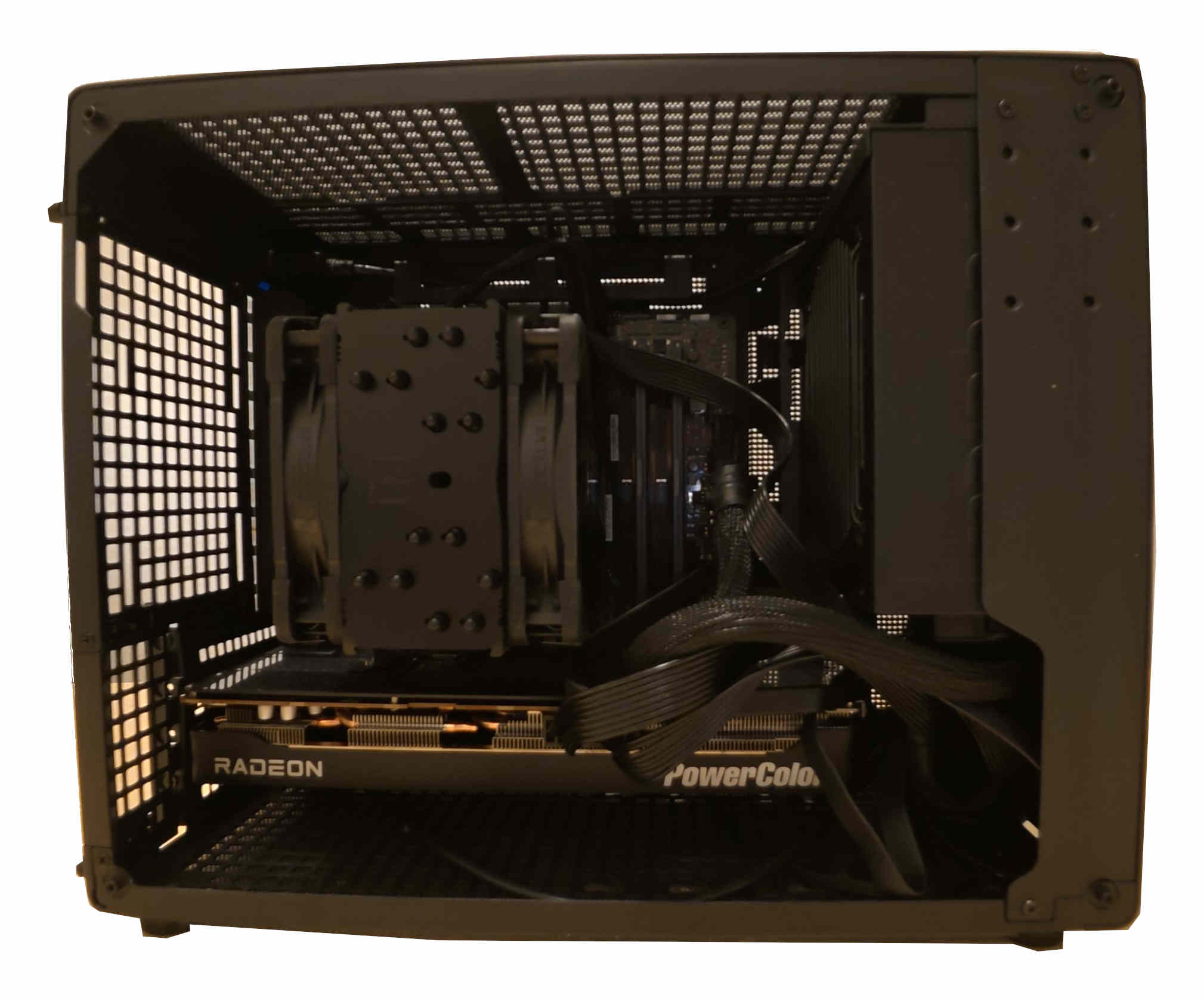
To support the RX 9070 XT (and other AMD graphics cards), up-to-date firmware drivers and a Linux kernel are required. For this reason, the Linux kernel 6.18.18 is now available for the ArchivistaBox 2026/III. The Linux firmware dates from mid-March 2026. This also had to be integrated. As a small “side note,” it should be added that the current firmware for all devices available under Linux is 1.8 GB in size. About three years ago, it was still approximately 0.9 GB, or half that size.
This meant that the boot mechanism for the ArchivistaBox also had to be adjusted. Previously, the entire ISO file was stored in the boot partition (5.6 GB). Since the data is temporarily duplicated during an update, the 2023/III release would have “overflowed” the boot partition. Now there is a smaller essential image (approx. 1.7 GB), which “saves” the previous size of the boot partition for the next few years.
Once all these hurdles were overcome, the ArchivistaBox could finally be booted with the RX 9070 XT graphics card. Of course, many other current hardware components also benefit from these adjustments and are now supported accordingly.
22 GB: AMD’s ROCm “drivers”
The groundwork was laid with the upgrade of the Linux kernel to version 6.18.18. To ensure that modern graphics cards are equipped for rendering and AI tasks, additional drivers are required. Although “drivers” isn’t really the right term here. In the case of AMD, it’s the ROCm package. It currently takes up about 22 GB. That’s right—22 GB of hard drive space is required just to enable the graphics card for tasks in the fields of graphics and artificial intelligence.
By way of comparison, the current ISO file for the ArchivistaBox requires approximately 4.1 GB. This means the graphics card requires about 5.x times more data. Of course, one might ask whether less wouldn’t be more? Certainly, less would be more, but ultimately it would be up to AMD to deliver less. Or competitors who bring corresponding products to market. Or software that could manage with less power.
Local AI with Ollama
Once the ROCm drivers from AMD were properly integrated, the first local AI could be launched. Or rather, the first AI had of course been set up long before the ROCm integration, in order to subsequently determine just how “painfully slow” the CPU actually is at delivering results under maximum load. One example is image categorization using the new model implemented in the ArchivistaBox. Using the Ryzen 9590 3XD processor with all 32 threads, it takes about 2 minutes per image. Using the graphics card with ROCm and the RX 9070 XT, it takes about 1.1 seconds.
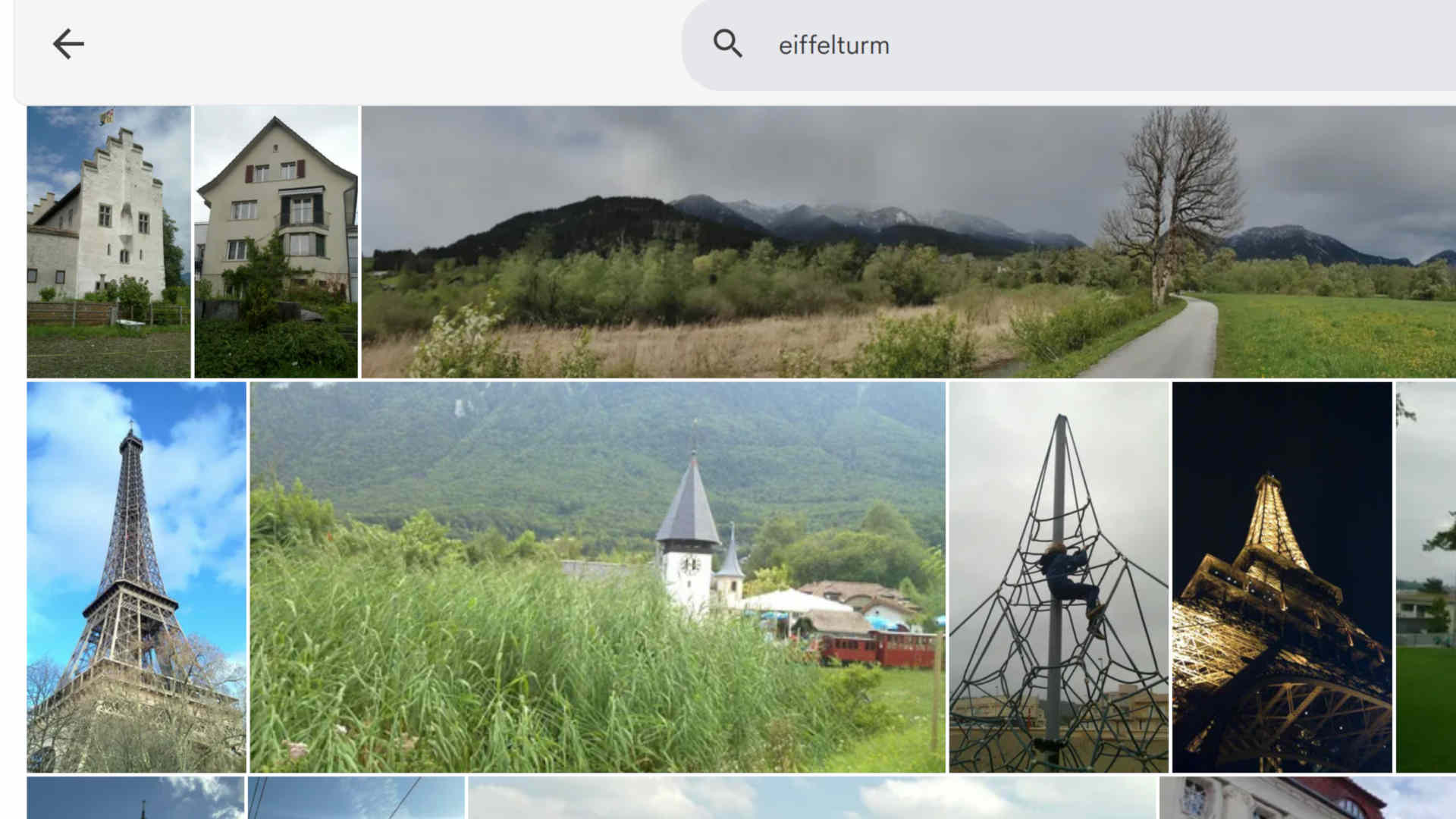
Example of poor image recognition (Immich) using the search term ‘Eiffel Tower’
Of course, software (such as Immich) can also be used that operates significantly faster or without a graphics card to recognize images. However, the results do not reflect state-of-the-art performance. Consider the search example “Eiffel Tower.” Above is a view of the results using Immich. While it is not the case that the Eiffel Tower is not found at all, the correct results are buried deep in the list.
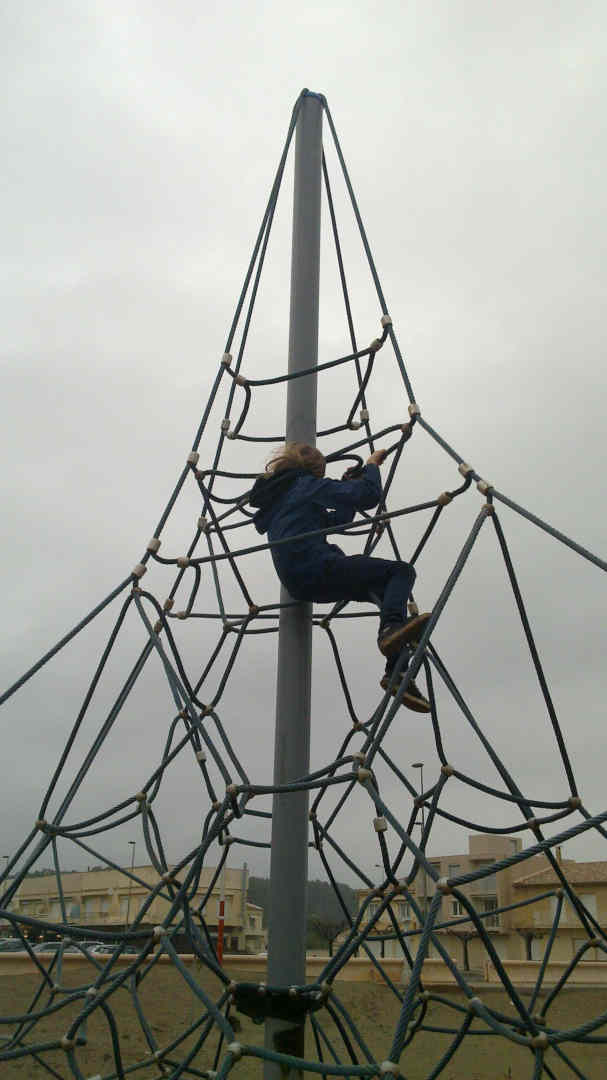
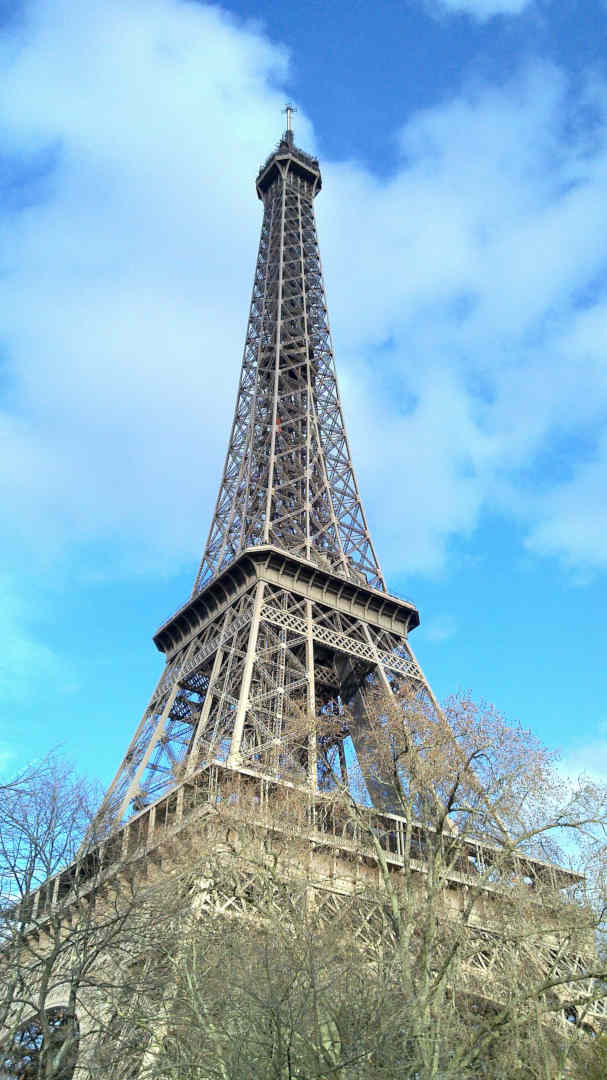
By comparison, the new engine in the ArchivistaBox tags the image on the left with: “playground; climbing frame; child; climbing; wire mesh.” The image on the right, the ‘real’ Eiffel Tower, is tagged with “Eiffel Tower; Paris; France; steel structure; sky.” These differences are so significant that the ArchivistaBox prefers to “build in” a good engine here, even if this requires a native graphics card.
Image recognition is just one specific application of Ollama. Currently, several hundred models are available, all of which run exclusively locally on the ArchivistaBox 2026/III (network access must be disabled for Ollama). These include the well-known chat models, as well as translation and content summarization models. The results are already “damn” good, to put it bluntly.
Speech recognition with Whisper
The ArchivistaBox has had speech recognition since 2021. Tests conducted at that time using Swiss German did not produce truly usable results. As an example, here is a short sequence from the film “Die Schweizermacher” (Rolf Lyssy, 1978, from approx. 50 seconds to 1 minute 20 seconds), first showing the (previous) result with Vosk (Original text translated into English):
59.79: You’ve been overlooking me for a long time
62.94: Where can I find information on how to improve the professional image of foreigners?
66.57: So that citizens can learn more about other countries
71.07: We had to approve a massive neutral sum for Soli Solid to cover the costs of the rock
Here’s the latest issue featuring Whisper:
00:00:57: Name a few qualities
00:01:02: that we must require of a foreigner
00:01:06: in order for them to become a citizen of our country.
00:01:10: What kind of person must they be?
00:01:11: Neutral.
00:01:14: Hardworking.
It’s easy to see that the “modern” engine not only achieves a nearly 100% accurate translation into High German—even for Swiss German—but also renders the sentence exactly as it was spoken. Achieving such a feat with open source—after a great deal of work and uncertainty—is certainly a source of pride. In that spirit, we can say: joy reigns. For our existing and new customers, and for the open-source community.
Two more notes on Whisper: Where there is much light, there is also some shadow. Whisper (fittingly, given its name) sometimes has a habit of “hallucinating” text where there is none—that is, sometimes, when the audio level approaches zero, the engine finds or invents text where none exists. It should also be noted that models specifically trained on Swiss dialects delivered poorer quality results than is the case with the latest version of Whisper.
Digital Sovereignty with the ArchivistaBox
For approximately 20 years, the ArchivistaBox has ensured that our customers keep their data locally. To this end, the ArchivistaBox offers ready-to-use solutions that, with version 2026/III, are now also available as 100 percent open-source solutions for container management (Docker), local AI agents, and image and speech recognition (Whisper). Anyone currently moving their business solutions to the cloud is missing out on the opportunity to act with digital sovereignty for the long term. In the current political climate, this seems like a risky bet.
It is often argued that no local alternative is available. The ArchivistaBox 2026/III impressively demonstrates that this is not the case. The ArchivistaBox can be ordered ready-to-use with maintenance and support. Those who prefer to do this themselves can download the ISO file (2026 release) and install it on their own. The ArchivistaBox offers a radically simple solution for self-hosting that is also open source.
Docker, for example, can be launched directly via the link of the same name after the ArchivistaBox has booted up (approx. 10-20 seconds). Simply enter the username admin@yacht.lokal and password av2013, and you’re good to go. The same applies, of course, to the previous server virtualization solution (VirtBox). Here, too, simply enter the username root and the password av2013.

Enabling Ollama and Whisper
A modern AMD graphics card is recommended for both Ollama and Whisper. You will also need to download the ai.os file. It is approximately 30 GB in size but contains all the necessary components.
The ‘ai.os’ file (30 GByte!) must be located in the /home/archivista/data directory on the ArchivistaBox. Now switch to the root user (password av2013) via the terminal using ‘su’ and unpack the file: ‘unsquashfs -d ./ai ai.os’. Then activate the engine with ‘cp ./ai/desktop.sh /home/data/archivista/cust/desktop’ and reboot the system. After the reboot, you can run ‘ollama list’ in the terminal.
NAME ID SIZE MODIFIED
xyz44:latest b3cacc3eb7f 3.3 GB 18 hours ago
Of course, additional models can be added later. The Whisper engine can be launched using the ‘mp2txt.sh’ script in the ‘/home/archivista/data/ai’ directory. Currently, there is no graphical user interface for either Whisper or Ollama. A graphical interface is expected to be included in one of the upcoming versions of the ArchivistaBox.
Both Whisper and Ollama run even without a dedicated AMD graphics card. However, even with a fast CPU, the speed is 10 to 50 times slower. In short, it might be worth it for testing, but not for production. NVIDIA graphics cards are not currently supported. The community is cordially invited to “take on” this task.
Price Examples for the ArchivistaBox K2 and Everest
For business customers, the K2 model is available starting at 2,990.– and the Everest model starting at 4,990.–. These price examples reflect current market conditions for SSDs and memory modules (RAM). As such, the corresponding ArchivistaBoxes can only be ordered or delivered on a very short-notice basis. The hardware is very compact relative to its performance (30x33x20 cm) and therefore fits not only in server environments but also under any desk.
In an average office setting, both the K2 and Everest operate whisper-quietly. The new flagship models can be tested out at any time in Egg during an Open Friday. All ArchivistaBox software (including AI modules) is available for free and can be used without restriction. Support and maintenance contracts are available for both the hardware and the software of the ArchivistaBox.
P.S.: If anyone here is missing information about our flagship document management system, ArchivistaDMS, please note that the core technologies introduced here will be seamlessly integrated into ArchivistaDMS in the future. The examples of image classification and speech recognition mentioned above serve as illustrations of this.